
Let's be honest: the topic of artificial intelligence is now heard from every iron. Everyone wants AI, everyone is afraid of being left behind. CEOs demand that CTOs "implement GenAI yesterday", while marketing paints beautiful presentations. But when the euphoria subsides and real work begins, most projects crash into harsh reality.
It turns out that the most expensive algorithm is powerless if it is "fed" garbage or outdated data.
Artificial intelligence is the engine. And data is fuel. And, unfortunately, in most companies this fuel is contaminated, spilled in different canisters and often not available at all. We used to call this the problem of "data silos". In practice, it looks like this: the marketing department has some numbers in its CRM, financiers have others in 1C or SAP, and logistics keeps records in its own Excel. To bring this into a single report for the board of directors, analysts spend days to weeks building complex "crutches" with vendor collection and processing from various sources.
It is at this point that Microsoft Fabric enters the market. This is not another cosmetic update to Azure. This is perhaps the most serious attempt by the industry in recent years to stop this chaos. When we talk about this product, we need to understand: before us is not just a set of services, but a complete Microsoft data platform, which should finally stitch together all the disparate pieces of analytics into one understandable organism.
In this material, we will analyze "under the hood" what Fabric is, why the OneLake concept saves budgets (and the nerves of data engineers), and how not to confuse this platform with Azure Service Fabric.
Chronic pain of modern data infrastructure
To understand the value of Fabric, think back to what a typical day was like for a data engineer at a large company before unified platforms were implemented.
It is a constant juggling of different products and technologies and the struggle to integrate them with each other. You have a separate data ingestion tool, such as Azure Data Factory. The data is then loaded into the Data Lake (Storage). To process them, you bring up Databricks or Synapse (Compute) clusters. And for visualization, you need to move the data again - download (Import) to Power BI or Tableau.
Why is traditional data architecture becoming ineffective?
This "zoo" of products and technologies creates critical problems for business:
- Vendor Sprawl. The company pays for a dozen licenses, support for various services, and staff training.
- Fragility of the system. It is worth changing the data structure at the source, as the entire chain (pipeline) breaks, and analysts do not receive the morning report.
- Data duplication. The same terabytes are copied from system to system. Not only does this inflate cloud storage bills, it also creates confusion: which copy is the "master version"?
- Security as a night terror. Try setting up single access policies (Row-Level Security) when your data is scattered across five different SaaS and PaaS solutions.
As a result, Time-to-Insight (time from data generation to decision-making) stretches to days or weeks. In 2026, this is an unacceptable luxury.
Wondering how Microsoft Fabric integrates with your current analytics system?
Book an online appointment with our Development Manager.
What exactly is Microsoft Fabric?
At its simplest, Microsoft Fabric is an attempt to put the entire analytics puzzle together in one box. It is a SaaS platform (Software as a Service) that combines tools that previously existed separately into a single, seamless environment.
Just as with Microsoft 365 you don't need to bring up a server to open Excel and everything is easily inserted into PowerPoint, so with Fabric you don't need to assemble integrations and infrastructure to store, process and visualize data - everything is already connected and coordinated in one platform.
Key workloads within a single platform
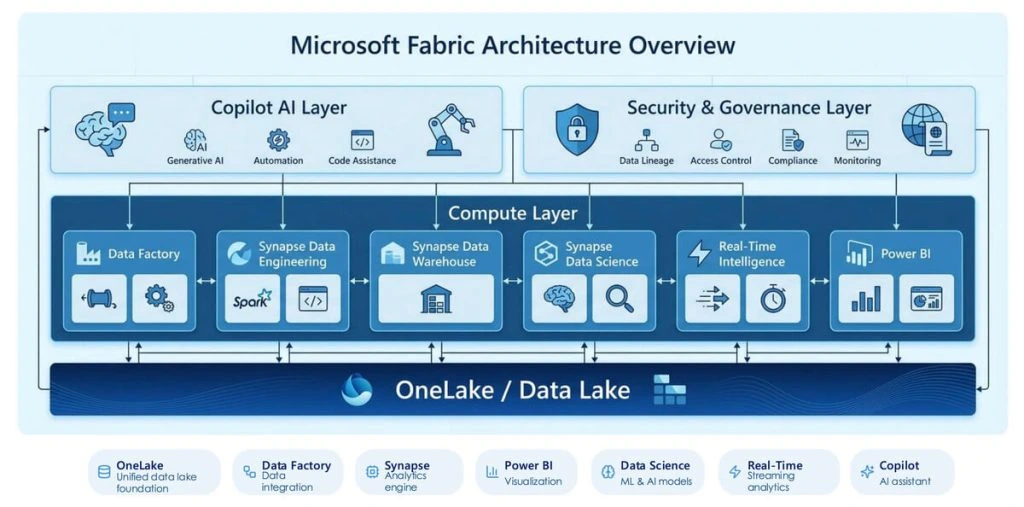
It combines seven key workloads:
- Data Factory: Orchestration and movement of data (150+ connectors to everything from Google Analytics to Oracle).
- Synapse Data Engineering: Working with big data through Apache Spark. The platform is up and running in seconds, without the tedious setup of clusters.
- Synapse Data Science: An environment for training ML models with integrated MLflow.
- Synapse Data Warehousing: High Performance SQL for Classic Analytics.
- Real-Time Intelligence: Processing streaming data (IoT, logs, user clicks) here and now.
- Power BI: The market leader in visualization.
- Data Activator: A new component that allows you to automatically react to changes in data (for example, send an alert to Teams if sales have dropped).
But simply putting the tools together is not enough. The main magic happens at the storage level.
OneLake: The End of the Copy Era
This is where Microsoft really changes the game. OneLake is the heart of Fabric. Marketers call it the "OneDrive for data," and the analogy is surprisingly apt.
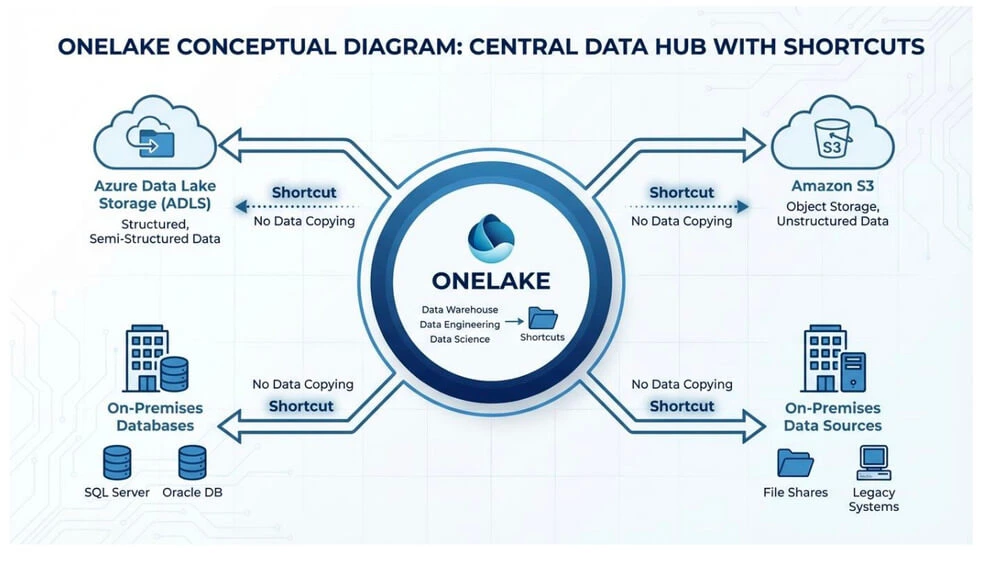
How does OneLake simplify working with large volumes of data?
Previously, to build a report in Power BI based on big data, you often had to import that data inside Power BI. This created a volume limitation and made you wait for a refresh.
OneLake offers a different approach:
- A single format. All data inside Fabric is automatically stored in the open Delta Parquet format. It doesn't matter if it's an SQL table or a Spark output, they're physically the same files.
- Shortcuts (Shortcuts). This is probably the most powerful feature. If your historical data resides in Amazon S3 or Azure Data Lake Gen2, you don't need to spend months migrating. You simply create a "shortcut" in OneLake. The system sees this data as if it resides locally, even though it physically resides in AWS.
Direct Lake is a speed-changing mode.
Thanks to OneLake, a new connection mode has appeared in Power BI - Direct Lake. It combines the speed of Import mode with the relevance of DirectQuery mode. Power BI simply reads the delta files directly from OneLake without copying them to its memory. This allows you to analyze billions of rows with incredible speed, without burdening the source with constant requests.
Fabric and AI: Why the platform is ready for GenAI
Let's go back to where we started - artificial intelligence. Why companies choose Fabric specifically for AI strategies?
Managing data quality and security for AI
First, Copilot in Fabric.
It's not just a chatbot. This is an assistant built into each link:
- For the engineer: Copilot will help you write complex Python code to transform data or optimize an SQL query.
- For the analyst: You can ask: "Create a report that shows the dependence of sales on weather", and Copilot will generate visualizations.
- For business: Ability to ask questions to data in human language (new level Q&A).
Secondly, it is Governance.
AI that learns on "dirty" data will "hallucinate." Fabric has built-in Microsoft Purview tools. You can automatically flag sensitive data (such as passport numbers), track data lineage (Lineage), and ensure that the AI model uses only verified information.
Real business scenarios: What it looks like in practice
A dry theory does not give a complete picture. Let's consider two examples of transformation.
Case #1: Manufacturing giant and IoT
Situation: The factory has thousands of sensors on the equipment. Data were collected, but analyzed post facto - once a week. When the accident happened, the engineers saw it in the report too late.
Solution: Using Real-Time Intelligence in Fabric. Data streams from the sensors go directly to OneLake. Data Activator is configured so that when the temperature deviates by 5%, a repair request is automatically created in the ERP system.
Result: Transition from reactive repair to proactive maintenance. Saving millions on idle lines.
Case #2: Big retail and personalization
Situation: Marketing wants to launch personalized offers, but data about online orders and offline purchases are in different databases. Compiling a customer profile (Customer 360) takes too much time.
Solution: Instead of physically moving data from all over the place, the company used Shortcuts to virtually merge databases into OneLake. AI-models got instant access to the complete profile of the client.
Result: Personalization of offers in real time directly at the checkout or in the app.
Want to understand if Microsoft Fabric is right for your business?
Leave a request - we will show it on your case.
WARNING! Do not confuse: Microsoft Fabric vs Azure Service Fabric
Even experienced IT people sometimes get lost in Microsoft naming. This is a critical moment, so let's fix the difference once and for all. This is not an "old and new version", these are fundamentally different tools.
| Characteristic | Microsoft Fabric | Azure Service Fabric |
| Sphere | Data & Analytics (Data and Analytics). | App Infrastructure (Application infrastructure). |
| What is it? | SaaS platform for building reports, ML models and repositories. | PaaS platform for orchestrating microservices and containers. |
| User | Data Engineer, Data Analyst, CDO. | Software Developer, DevOps Engineer. |
| Analogy | This is a "factory" for data processing. | This is the "foundation" for the house (program). |
If you hear "Service Fabric", think of the complex development of high-load applications (for example, Azure's own services are partially running on Service Fabric). When it comes to dashboards, SQL, pipelines, and AI, it's all Microsoft Fabric.
Conclusion: is it time for a transition?
The data market is cyclical. Ten years ago, we were breaking monoliths into microservices and individual tools. Now the pendulum has swung in the other direction - towards consolidation.
Microsoft Fabric is the answer to the business request: "Make it simple for us." Companies are tired of maintaining a staff of engineers who are only engaged in "fixing pipes" for data transmission. Business wants insights.
Should you switch to Fabric today?
If you are already deep in the Microsoft ecosystem (using Power BI, Azure SQL), then Fabric is the most logical evolutionary step. It allows you to start small (for example, only with analytics) without breaking the existing infrastructure, thanks to the same Shortcuts.
It's not just about technology. It's about whether your company is ready to see data as an asset rather than a byproduct of operations. In a world ruled by AI, whoever turns raw bytes into sound business decisions the fastest wins.
Are you ready to move into a new era of analytics?
Let's discuss your request - book an online meeting with our development manager.
FAQ: Answers to uncomfortable questions
Does switching to Fabric mean I'm tied to Microsoft forever?
Fabric stores data in Delta Parquet format. This is an open format (open source).
This means that your data is not "walled" in the vendor's proprietary format.
You can read them with other tools (such as Databricks) even if
decide to abandon Fabric. This significantly reduces the risks of Vendor Lock-in.
What about security if all the data is in "one lake"?
Centralization actually simplifies security. Instead of setting firewalls to 10
systems, you control access through OneSecurity (a universal security model).
If you have denied access to the payroll folder at the OneLake level, the user
won't see them either through SQL, Power BI, or Spark.
Will it stretch a small business on a budget?
Previously, similar Enterprise solutions cost thousands of dollars at the start.
Fabric uses the Capacity model. You buy a certain computer
capacity (SKU) that you "grey" between all services. If the load is small,
you can buy the smallest capacity (F2) and pause it when it
not used, paying only for seconds of operation.